


This is the official implementation of WeightCLIP: Aligning Datasets and Models for Weight Space Learning (ICML 2026).
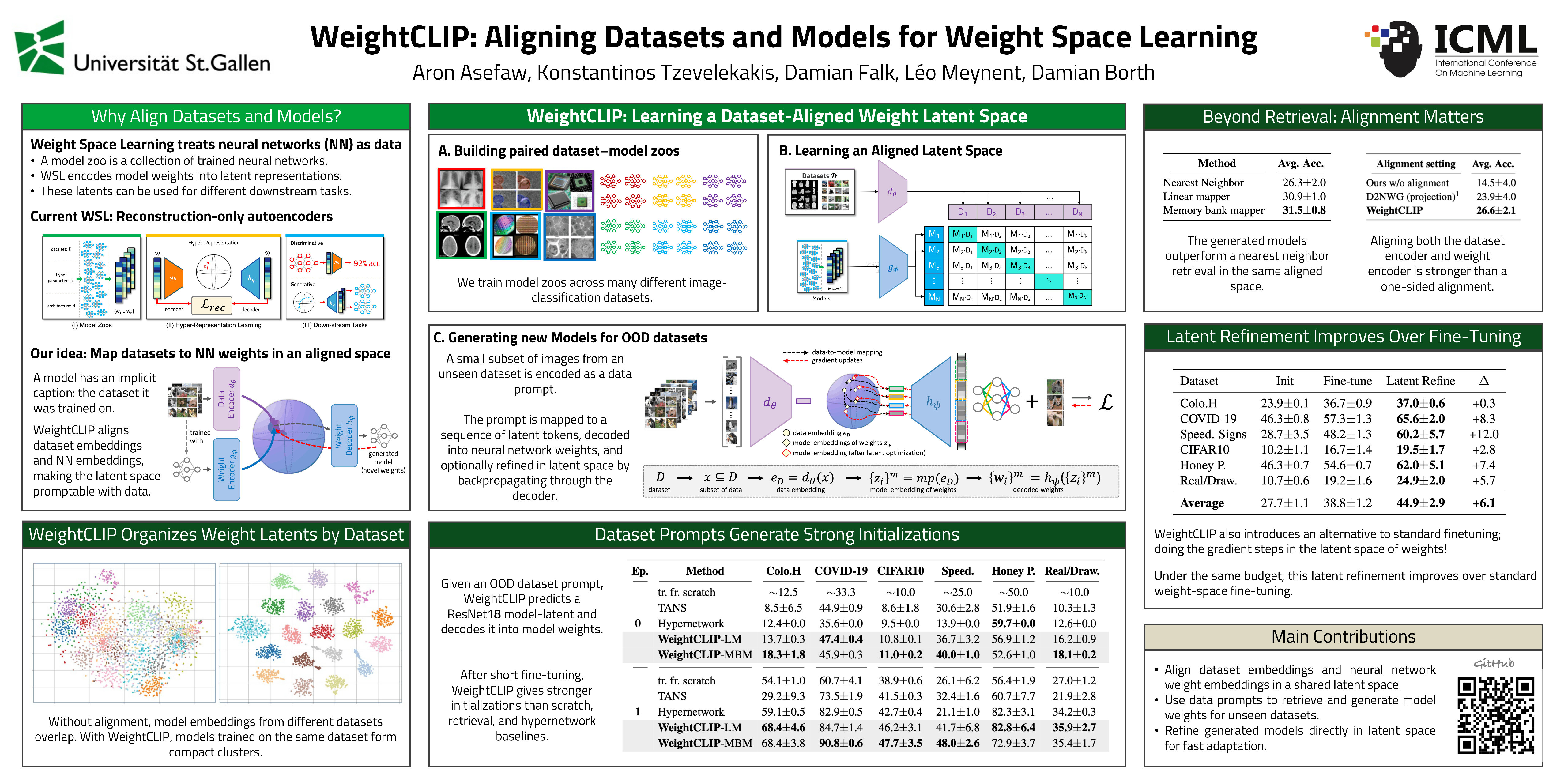
We propose WeightCLIP, a method for learning a dataset-aligned latent space for neural networks. A weight-space autoencoder encodes models into latent representations while a dataset encoder encodes samples of the datasets they were trained on, and the two are aligned with a contrastive objective that reshapes the weight space using the datasets as a semantic reference frame. Once trained, a data prompt from an unseen dataset can be mapped into the aligned space and decoded into model weights tailored to that dataset, and a latent refinement step can further improve generated models beyond standard fine-tuning. Explicitly incorporating dataset information strengthens dataset–model retrieval, out-of-distribution model generation, and refinement.

Requires Python >= 3.10 (tested with 3.10.12) and, for training, a CUDA-capable GPU.
conda create -n weightclip python=3.10 -y
conda activate weightclip

pip install -r requirements.txt
pip install -e .
Training proceeds in two steps: build the model zoos, then train the aligned latent space.
Skip this if you already have zoos.
Pre-built CNN3 zoos (Hugging Face). The trained CNN3 model zoos are published on the
Hugging Face repo as one packed
.tar.gz per dataset (~2.5 GB total). Download and unpack them into a zoo root:
hf download aasefaw/WeightCLIP --include "model_zoos/cnn3/*" --local-dir /path/to/hf_zoos

mkdir -p /path/to/zoos/cnn3
for f in /path/to/hf_zoos/model_zoos/cnn3/*.tar.gz; do
  tar -xzf "$f" -C /path/to/zoos/cnn3
done
Each archive unpacks to that dataset's tune_zoo_<dataset>_cnn3 directory; point the root_dir in the
matching config/data/checkpoints_dataset/<dataset>_cnn3.yaml at the unpacked folder. (Only CNN3 zoos
are provided pre-built — build the ResNet18 zoos with the steps below.)
Otherwise, build the zoos from scratch:
1. Build dataset.pt files from raw images. The zoo trainers read one dataset.pt per dataset.
Get the raw images from the TANS meta-dataset
(train,
test), which are laid out as
<root>/<task>/{tr,va,te}/<class>/<images>, then convert them:
# Train datasets (CNN and ResNet zoos share the same images)
python scripts/build_dataset_pts.py --src /path/to/raw_m_train --out /path/to/dataset_pts

# Test / OOD datasets. cifar10 is a Test task but is not in the TANS download,
# so --with-cifar10 fetches it from torchvision in the same format (no manual download).
python scripts/build_dataset_pts.py --src /path/to/raw_m_test --out /path/to/dataset_pts --with-cifar10
This writes <out>/<name>/dataset.pt (float32 [N, 3, 32, 32] images in [-1, 1]), named to match
the datasets in config/data/train_*.yaml.
2. Train the zoos. Point the trainers at the built files with DATASET_PT_ROOT (output and other
hyper-parameters are still set via env vars at the top of each script, e.g. ZOO_ROOT):
DATASET_PT_ROOT=/path/to/dataset_pts bash scripts/train_resnet18slim_zoos.sh   # ResNet18 zoos
DATASET_PT_ROOT=/path/to/dataset_pts bash scripts/train_cnn3_zoos.sh # CNN zoosTraining is configured with Hydra; run.py selects an experiment with
--config-name and accepts overrides for any field. The zoos used by each experiment are listed in
config/data/train_resnet.yaml and config/data/train_cnn.yaml. A run writes a
checkpoint.pt and a sibling dataset_encoder.pt under root_dir/experiment_name.
python run.py --config-name contrastive_multi_zoo_resnet_alignment   # ResNet18
python run.py --config-name contrastive_multi_zoo_cnn_alignment      # CNN

# overrides and single-process (debug) execution
python run.py --config-name contrastive_multi_zoo_resnet_alignment \
  root_dir=/path/to/experiments experiment_name=weightclip_resnet \
  alignment.objective=siglip alignment.weight=0.25 dataset_encoder.set_size=10
python run.py --config-name contrastive_multi_zoo_resnet_alignment --debugGiven a trained weight-space autoencoder and a dataset encoder, use a dataset prompt to generate models and optionally refine them.
Pretrained ResNet18 and CNN checkpoints are available on the Hugging Face model repo. Each includes a checkpoint.pt and its sibling dataset_encoder.pt; point --sane-ckpt at the downloaded checkpoint.pt (or its directory) to run the commands below without training from scratch.
Map an out-of-distribution dataset prompt to model weights and evaluate after 0, 1, and 10 epochs of
fine-tuning. --mode selects the mapper: direct_decode (linear mapper, LM), memory_bank
(memory-bank mapper, MBM), neighbour (retrieval), or scratch (from-scratch baseline).
python scripts/dataset_to_model.py \
  --sane-ckpt /path/to/experiment/checkpoint_000000 \
  --arch cnn3 --mode memory_bank
Out-of-distribution dataset-to-model generation on ResNet18 (test accuracy %, after 0/1/10 epochs of fine-tuning):

Refine a generated model's latent with gradients through the decoder, which outperforms standard fine-tuning under the same compute budget:
python scripts/latent_refine_with_translator.py \
  --sane-ckpt /path/to/experiment/checkpoint_000000.pt \
--arch cnn3 --steps 20 --scale-to-shell@inproceedings{asefaw2026weightclip,
title = {WeightCLIP: Aligning Datasets and Models for Weight Space Learning},
author = {Asefaw, Aron and Tzevelekakis, Konstantinos and Falk, Damian and Meynent, L\'eo and Borth, Damian},
booktitle = {Proceedings of the Forty-third International Conference on Machine Learning (ICML)},
year = {2026}
}