
Run the model. Build the team. Give it tools. Verify the result. Operate the machines.
OWLLM brings local inference, cloud models, coding agents, visual agent teams, model training, a shared browser, release automation, messaging, and remote devices into one cross-platform desktop application.


Download · See the workstation · Why it is different · Compare


Linux: AppImage
· Debian / Ubuntu .deb
|
Every platform: release notes and checksums
The installer is the workstation shell. Runtime modules are selected for the machine instead of bundling every engine into every download. Windows x64, Linux x86-64, and Apple Silicon have stable release packages; Lima isolation on macOS and bubblewrap isolation on Linux remain beta.
The AI landscape is split into excellent but separate products:
- Editors help a coding agent change a repository.
- Self-hosted gateways put an assistant in chat applications.
- Local-model tools download and serve models.
- Training tools adapt models.
- Remote-control tools operate other computers.
OWLLM is the connective tissue. It treats the model, agent runtime, tools, project memory, verification, and machines as parts of one system. A local model and a cloud subscription can sit in the same team. A GPU workstation can serve the model while a safer machine runs the agents. A browser specialist can test the site while a critic checks the implementation and a rule-based publisher refuses to ship a failing build.
This is not “chat with more buttons.” It is a desktop control plane for doing work with models.
Most AI applications assume the model, agent, tools, and files all live in the same place. OWLLM separates them deliberately.
| Layer | Put it where it makes sense |
|---|---|
| Model | A local GGUF on this computer, an API, a supported CLI subscription, an OpenAI-compatible server, or a model offered by another paired OWLLM device. |
| Agent | One focused coding page, a private worktree, a coordinated team, an OS-level sandbox, or another machine. |
| Tools | Files, Git, terminal, MCP servers, the OWLLM browser, messaging bridges, paired devices, or approved KVM hardware. |
| Control | Project rules, role-specific permissions, live steering, Notebook steps, memory, and explicit approval boundaries. |
| Proof | A real verification command, a critic verdict, visible diffs, and a deterministic publisher. |
Run native GPU inference on the strongest machine and run tool-using agents somewhere safer. OWLLM can expose its inference server over an OpenAI-compatible endpoint and let another installation use that model. Network serving is opt-in and key-protected; because the transport is plain HTTP, it is for a trusted LAN, VPN, or tunnel—not the open internet.
Each role can use the model appropriate to its job: a fast local GGUF for routine work, a reasoning API for architecture, a CLI subscription for coding, or a remote GPU for a larger model. Local and cloud models are peers in the same picker and run view; selecting a cloud model is the point at which that provider receives the prompt.
Local GGUF agents use native structured tool calling. API agents and supported subscription CLIs share the same project surface. OWLLM-only capabilities such as the browser are exposed through its authenticated, loopback MCP gateway where the provider path supports it.
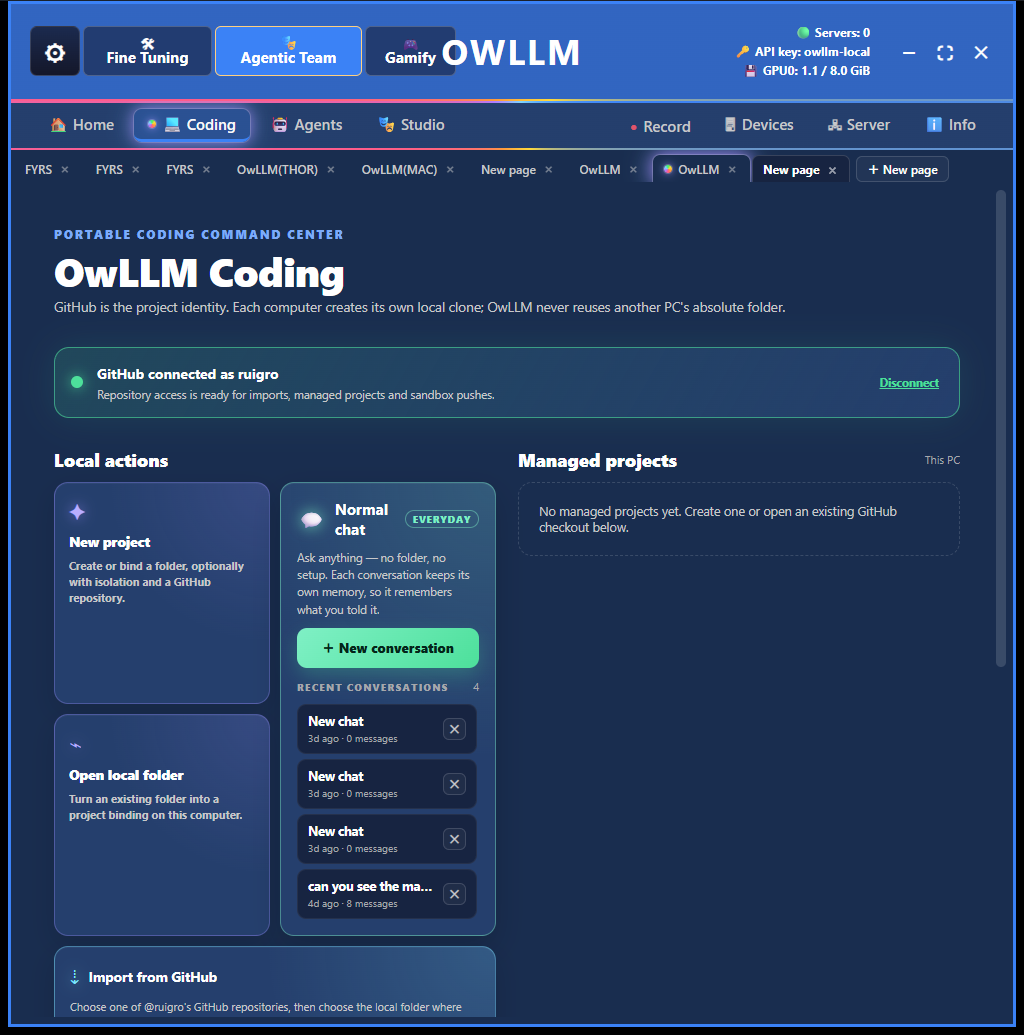
Open or import a repository, create parallel pages, keep each active task in its own branch and worktree, and bring project rules, Notebook steps, memory, terminal, files, browser, diffs, and verification into the same workspace. “Normal chat” is still available when no project is needed.
|
|
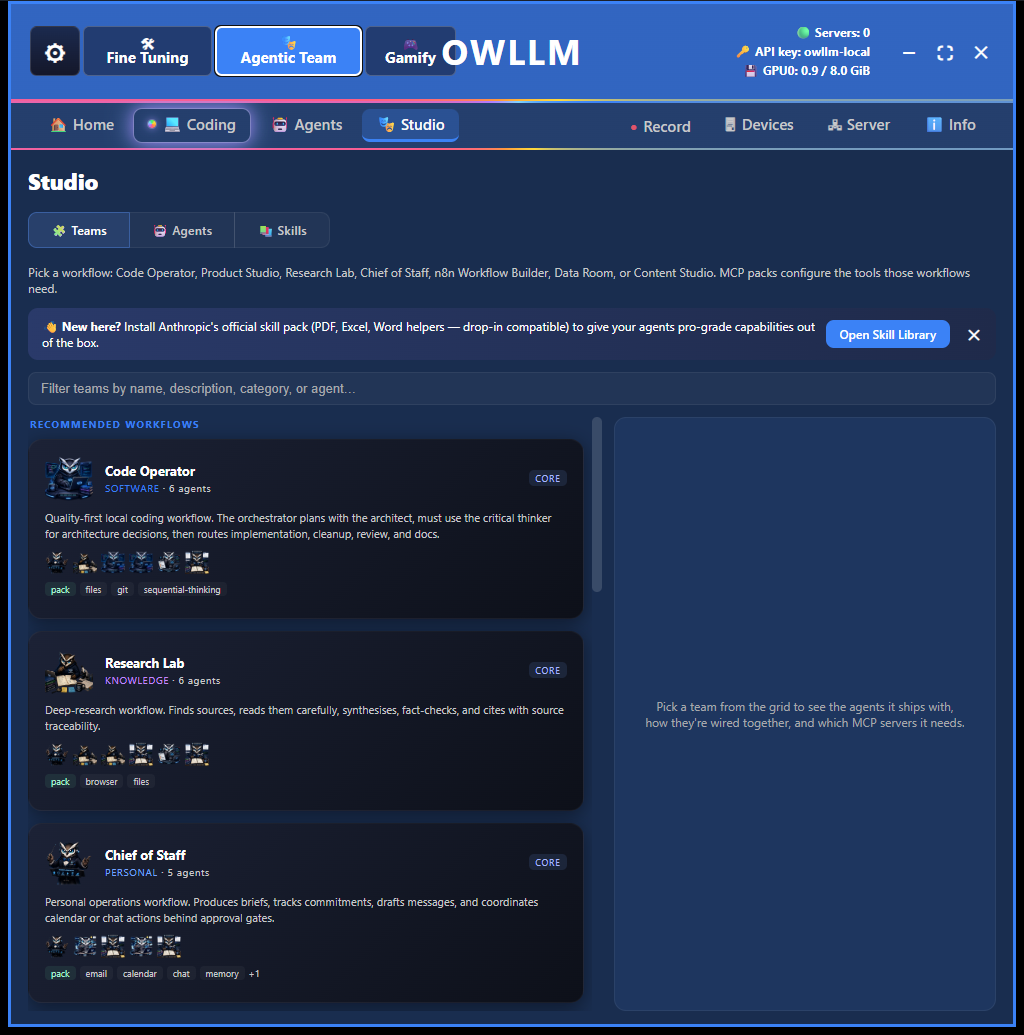
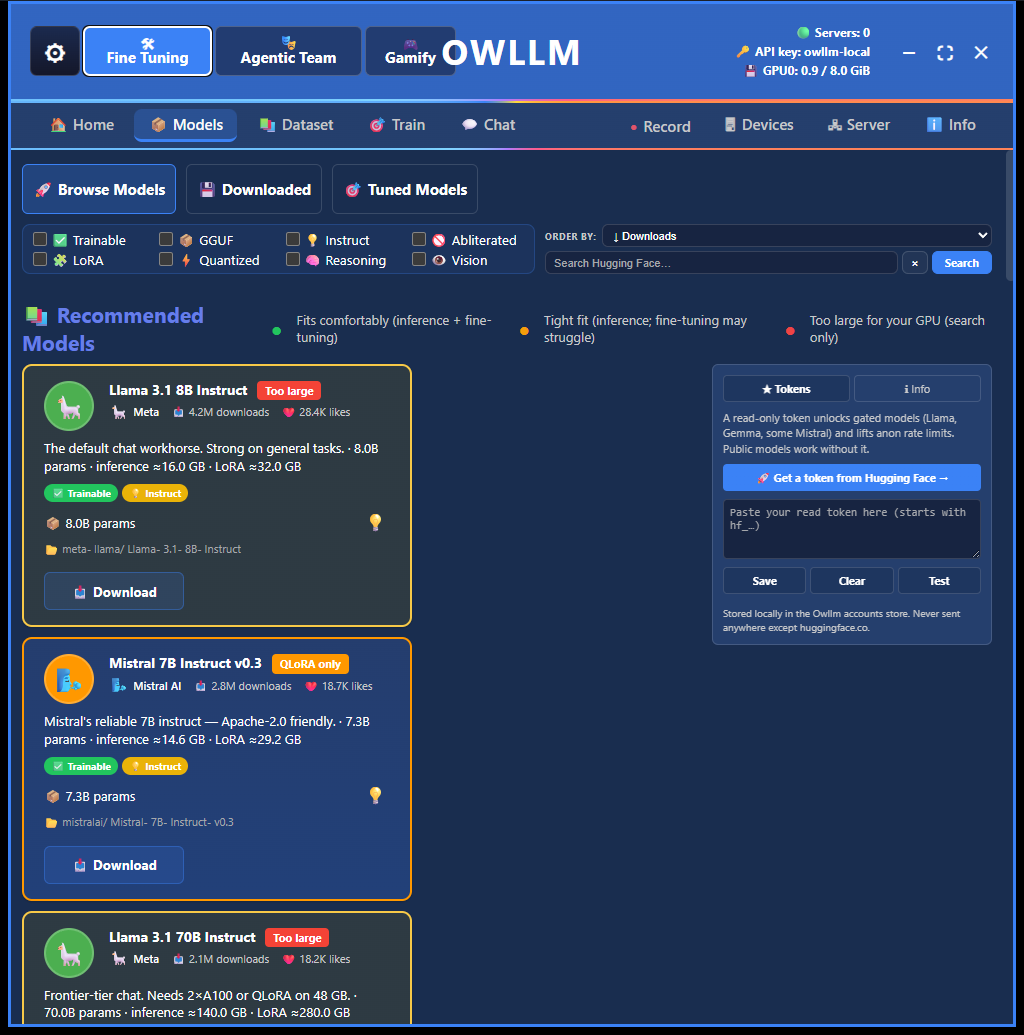
| Team Studio. Start from job-shaped workflows such as Code Operator, Research Lab, and Chief of Staff. Inspect the roles, handoffs, skills, and required MCP packs before a run. | Model Workshop. Browse models with fit ratings based on the selected hardware, download compatible artifacts, build datasets, train adapters, and export practical GGUF variants. |
These are captures of the shipping desktop application, not design mockups.
OWLLM’s Coding surface is designed for long-running, tool-using work:
- Start from a project. Create a repository, open a local folder, or choose from the repositories of the connected GitHub account.
- Isolate the task. Each coding page can work in a private Git worktree and branch. Parallel pages do not have to edit the same checkout.
- Give the agent durable context. Project rules define the non-negotiable constraints. Memory stores reusable facts separately from the recent worklog. The Notebook turns rough notes into feedable next steps.
- Watch real work. Files, terminal output, tool calls, plans, diffs, and browser activity remain inspectable. Mid-run messages steer the active job instead of disappearing into the next turn.
- Add independent pressure. A second agent can work beside the coder, or Solo-Loop can move through Coder → Critic → Publisher.
- Define “done.” The Verification Gate executes the repository’s actual command. A model saying “tests pass” is not a pass.
- Ship deterministically. With project release settings configured, the Publisher can synchronize, version, build, sign, publish, and verify the updater from rule-based host code.
The editor remains yours. Use OWLLM beside VS Code, JetBrains, or another editor when you want a dedicated agent control plane around the repository rather than another editor window.
An OWLLM team is not a group chat with role names. It is an execution graph: roles have tool scopes, skills, memory, model assignments, and allowed handoffs. The orchestrator can delegate to specialists in parallel, then integrate their results. The run view shows which agent acted, what it called, what it wrote, and what verdict it reached.
Built-in starting points cover software, research, personal operations, data, content, and web automation. Teams can be edited or assembled from a brief. Personal agent profiles and rule cards let the user carry a preferred role, constraints, and workflow between projects without mixing private project memory into the exported profile.
For smaller jobs, Solo-Loop keeps the control structure but removes the team ceremony: one implementer, one critic, and one publisher.
OWLLM does not merely connect to a local server. It owns the practical model lifecycle:
- Discover: Hugging Face search, curated recommendations, and hardware-aware fit ratings.
- Run: GGUF inference through
llama.cpp, automatic server lifecycle, context sizing, and compatible vision projectors. - Compare: local, API, and subscription models in a multi-column playground before assigning them to agents.
- Build data: turn PDF, DOCX, URL, and text sources into instruction JSONL.
- Fine-tuning: train LoRA/QLoRA adapters with visible progress and resumable workflows where the selected hardware and model format support it.
- Deliver: convert supported Transformers models and export GGUF quantizations.
- Research: model-safety and refusal-direction tooling is available as an explicit advanced workflow, not silently applied to downloaded models.
Model compatibility still matters. “Local model” does not mean every file on Hugging Face can train, use vision, or call tools. OWLLM surfaces format and hardware constraints instead of promising universal support.
OWLLM owns a persistent multi-tab browser window. The user can log in and watch; approved agents can navigate, inspect indexed elements, click, fill, select, press keys, and test desktop, phone, and tablet layouts. It can open localhost previews and live sites without requiring a separate Playwright installation. Consequential actions such as sending, publishing, or deleting remain subject to the project’s approval rules.
Telegram, WhatsApp, Discord, Slack, LINE, and email bridges can route a conversation into a selected OWLLM project and model. OpenClaw has a much wider channel and plugin ecosystem; OWLLM’s distinction is that its bridges enter the same visual project, team, memory, model, and verification environment used on the desktop.
Pair OWLLM installations to offer models, run approved commands, open an interactive remote shell, or synchronize a project. Pairing uses per-device cryptographic identity and target approval; a matching account helps discovery but does not grant control. Project synchronization uses three-way merge logic and refuses to silently choose a side of a real conflict.
For machines below the operating system, an explicitly enabled NanoKVM or PiKVM tool can provide screenshots and approved keyboard, mouse, power, boot, or media actions. Fleet Control and KVM control ship off by default.
These products overlap, but they begin from different jobs. The useful question is not “which has agents?” It is “what is the center of the system?”
| OWLLM | VS Code agents | OpenClaw | |
|---|---|---|---|
| Center of gravity | A desktop AI workstation spanning models, projects, teams, tools, verification, and machines. | A code editor with local, background, cloud, and third-party agent sessions. | A self-hosted gateway connecting an always-available assistant to messaging channels, tools, plugins, and nodes. |
| Coding | Dedicated Coding pages, project rules, Notebook, memory, private worktrees, second agent, Solo-Loop, browser, gate, and publisher. | The strongest human editing/debugging/extension environment of the three; parallel agent sessions and worktree isolation are integrated with the editor. | Runs embedded or external coding harnesses and tools; coding is reached from the gateway/session model rather than a desktop repository workstation. |
| Agent organization | Visual team templates, explicit role graph and handoffs, per-role model/tools/skills, shared project Notebook, critic, and publisher. | Built-in and custom agents; sessions can run locally, in Copilot CLI, in GitHub cloud infrastructure, or through supported third parties. | Multi-agent routing, subagents, swarm coordination, and ACP-backed external harnesses. |
| Local models | Finds, rates, downloads, serves, compares, fine-tunes, converts, and quantizes supported local models. | BYOK can connect chat and agents to local providers such as Ollama; it is not a model training or quantization workstation. | Connects to llama.cpp, Ollama, LM Studio, and other self-hosted providers; its published center is the gateway, not model production. |
| Browser | Persistent visible OWLLM browser shared by user and agent, including localhost and device emulation. | Browser capabilities can be added through its tool, MCP, and extension ecosystem. | Built-in browser automation and browser-control tooling. |
| Isolation | Private Git worktrees plus WSL2 folder-sealed agent isolation on Windows; Lima and bubblewrap paths are beta. | Permission levels plus worktree or folder isolation for supported background sessions. | Per-agent sandboxing, tool policy, approvals, and controlled elevated execution. |
| Messaging / personal automation | Six bridges tied directly to OWLLM projects and teams. | Not the product’s primary control surface. | The clear specialist: a broad channel/plugin ecosystem, mobile nodes, cron, heartbeat, and an always-on gateway. |
| Release proof | First-class Verification Gate and deterministic Publisher around the project’s own command and release recipe. | Tests, SCM, hooks, terminals, and PR flows are available to agents inside the editor ecosystem. | Tools, skills, and workflow pipelines can build project-specific automation. |
| Best fit | You want one visual workstation for model ownership, coding/team control, verification, and your own hardware fleet. | You live in the editor and want AI woven into editing, debugging, extensions, and GitHub collaboration. | You want an open, extensible personal assistant reachable from many chat apps and running as a service. |
The comparison is based on the products’ current first-party documentation: VS Code agent overview, VS Code Copilot CLI and worktree isolation, VS Code BYOK and local models, OpenClaw overview, OpenClaw features, and OpenClaw tools and coordination.
- OWLLM does not replace VS Code’s editor, debugger, or extension ecosystem. It can sit beside them and own the agent/model/release control plane.
- OWLLM does not claim OpenClaw’s breadth of channels, plugins, mobile surfaces, or always-on automation. It goes deeper into the desktop model and verified project lifecycle.
- VS Code now supports parallel agents, worktrees, BYOK, and fully local chat. Saying otherwise would be outdated.
- OpenClaw supports local providers, browser automation, sandboxing, multi-agent coordination, and external coding harnesses. Calling it “just a WhatsApp bot” would be equally outdated.
OWLLM combines several boundaries because no single guard is enough:
- Model boundary: local prompts stay local when a local model is selected. API and subscription prompts go to the provider the user chose.
- Workspace boundary: parallel coding pages use branches and worktrees. Worktrees prevent accidental overlap; they are not a security sandbox.
- OS boundary: tool execution can be folder-sealed inside WSL2 on Windows. Lima on macOS and bubblewrap on Linux are available as beta paths.
- Tool boundary: roles receive scoped tools. Dangerous commands and consequential browser actions meet explicit guards or approval rules.
- Network boundary: inference serving and remote control are opt-in. Remote devices require pairing, permissions, and target-side approval for dangerous actions.
- Credential boundary: secrets live in per-user runtime storage and are excluded from repositories and release artifacts. Browser-vault secrets are encrypted at rest; credentials are not included in exported agent profiles.
- Proof boundary: verification means a command and exit code, not a model’s confidence.
No autonomous tool runner is risk-free. Keep isolation enabled, grant the smallest useful tool set, review third-party skills and MCP servers, and use a trusted network or encrypted tunnel for remote inference.
| Source | How it fits |
|---|---|
| Local GGUF | Private/offline inference through the managed llama.cpp runtime when the model, template, and hardware are compatible. |
| Cloud API | Built-in providers and compatible custom endpoints, using the user’s own account and billing. |
| CLI subscription | Supported Claude Code, Codex, Gemini, and Kimi subscriptions can run in the same project view after their official CLI login is connected. |
| Paired OWLLM device | Use a model hosted by another approved installation, allowing the GPU and agent machine to be different computers. |
Provider capabilities differ. Tool use, vision, context size, rate limits, offline operation, and sandbox behavior are checked per route instead of being assumed from a model name.
| Status | Meaning in OWLLM |
|---|---|
| Shipping | Windows x64, Linux x86-64 AppImage/.deb, and Apple Silicon .dmg; Coding, teams, Studio, local inference modules, browser, Notebook/memory, verification, model workshop, bridges, and opt-in Fleet Control are present in the released application. |
| Beta | Lima isolation on macOS and bubblewrap isolation on Linux require more hardening than the proven Windows/WSL2 path. Platform-specific provider CLIs and model formats may also impose their own limits. |
| Experimental | Gamify and the agent-driven world surfaces explore a more visual way to operate the same dispatch system. They are not presented as production release infrastructure. |
The latest release is the source of truth for current packages. The page intentionally avoids hardcoded package sizes and version numbers so the next release does not make the first screen false again.
- Download OWLLM for your operating system.
- Let onboarding inspect the hardware and install only the runtime modules needed on that machine.
- Download a compatible local model, add an API, connect a supported subscription CLI, or pair another OWLLM device.
- Open Coding for a focused repository, Agents for a coordinated team, Studio to shape the workflow, or Fine Tuning to work on the model.
- Keep isolation enabled for tool-using projects and set the project’s real verification command before publishing.
OWLLM is proprietary software owned by Far island Corporation Ltd. Official unmodified executables may be used free of charge; the source is not licensed for copying, modification, redistribution, sublicensing, or sale. See the complete OWLLM license.