
- 1. Introduction
- 2. Installation
- 3. Running SIMPLE-MOD
- 4. Contributors
- 5. Cite this work
SIMPLE-MOD (Singularity Integrated Module-key Producer for Loadable Environment MODules) is a Python tool to automatically generate module keys for easy access of container-based software packages. It supports three operation modes:
- GUI mode (default) — a Qt-based graphical interface.
- CLI interactive mode — a full-screen terminal UI powered by
prompt_toolkit, suitable for headless or remote environments. - CLI command mode — a non-interactive command-line interface for scripting and automation.
Currently, SIMPLE-MOD supports two commonly used module systems through pre-written templates:
- Environment Modules (https://github.com/cea-hpc/modules)
- Lmod (https://github.com/TACC/Lmod)
Other support can be added by adding customized templates.
SIMPLE-MOD is designed for HPC administrators who oversee software installation and deployment. Its purpose is to help administrators conveniently create module keys from software in Singularity/Apptainer container images, taking advantage of the installation-free portability. If your HPC systems use a module system (Environment Modules or Lmod) and Singularity/Apptainer, this may be your simple solution to deploy container-based software. This allows users to activate software with a simple module load command and use the executables as if they were installed natively, without needing to know they are using containers.
SIMPLE-MOD is most suitable for software accessible via a handful of executables. However, it is not suitable for all software or use cases. For example, it is not suitable for pure libraries, and may be not suitable for software that would be used as dependencies. It is at the administrators' discretion to determine which software packages can be deployed with SIMPLE-MOD. Administrators are also responsible for testing the deployed module keys on the clusters. The databases and templates provided with the code are for reference only, and the LSU HPC group shall not be held responsible for the installation, deployment, testing, and validation of the software.
SIMPLE-MOD is primarily designed for HPC administrators; however, interested users can also use it to generate customized module keys. Knowledge and permissions to set up customized module keys are required.
SIMPLE-MOD requires Python 3. Additional dependencies depend on the mode you want to use:
| Mode | Dependency | Install |
|---|---|---|
| GUI | PyQt6 or PyQt5 | pip install pyqt6 or pip install pyqt5 |
| CLI interactive | prompt_toolkit | pip install "prompt_toolkit>=3.0.52" |
| CLI command | (none beyond Python 3) | — |
The GUI automatically detects the available PyQt version, preferring PyQt6. Note that PyQt requires matching Qt libraries installed on the system to function. If Qt libraries are not available, it is recommended to install both PyQt and Qt libraries use Conda:
# PyQt6 via conda
conda install pyqt6 -c conda-forge

# Or PyQt5 via conda
conda install pyqt -c conda-forgeSIMPLE-MOD itself is installation-free. The recommended way to launch it is through the unified launcher simple-mod:
# No argument
#   Tries to launch GUI.
#   If GUI fails to start, launch CLI interactive mode
./simple-mod

# Pass `--nodisplay`
#   Force to run CLI interactive mode regardless GUI availability
./simple-mod --nodisplay

# Pass command-line arguments
#   Runs CLI command mode (see Section 3.3 for instructions)
./simple-mod <command> [options]If for any reason you cannot run it with Python on your system (e.g., lack of dependencies), you may also build a SIMPLE-MOD container image and run it with Singularity/Apptainer. The recipe is provided in recipe.def. To build it with Singularity/Apptainer, please run the below command in terminal:
singularity build simple-mod.sif recipe.defOnce the image is built, you may run it with:
singularity run simple-mod.sifAdditional path binding may be required to save module databases and generate module keys in the desired paths.
The GUI mode is the default when running ./simple-mod on a system with a display. It is the most intuitive and versatile tool. Below is the GUI of SIMPLE-MOD:
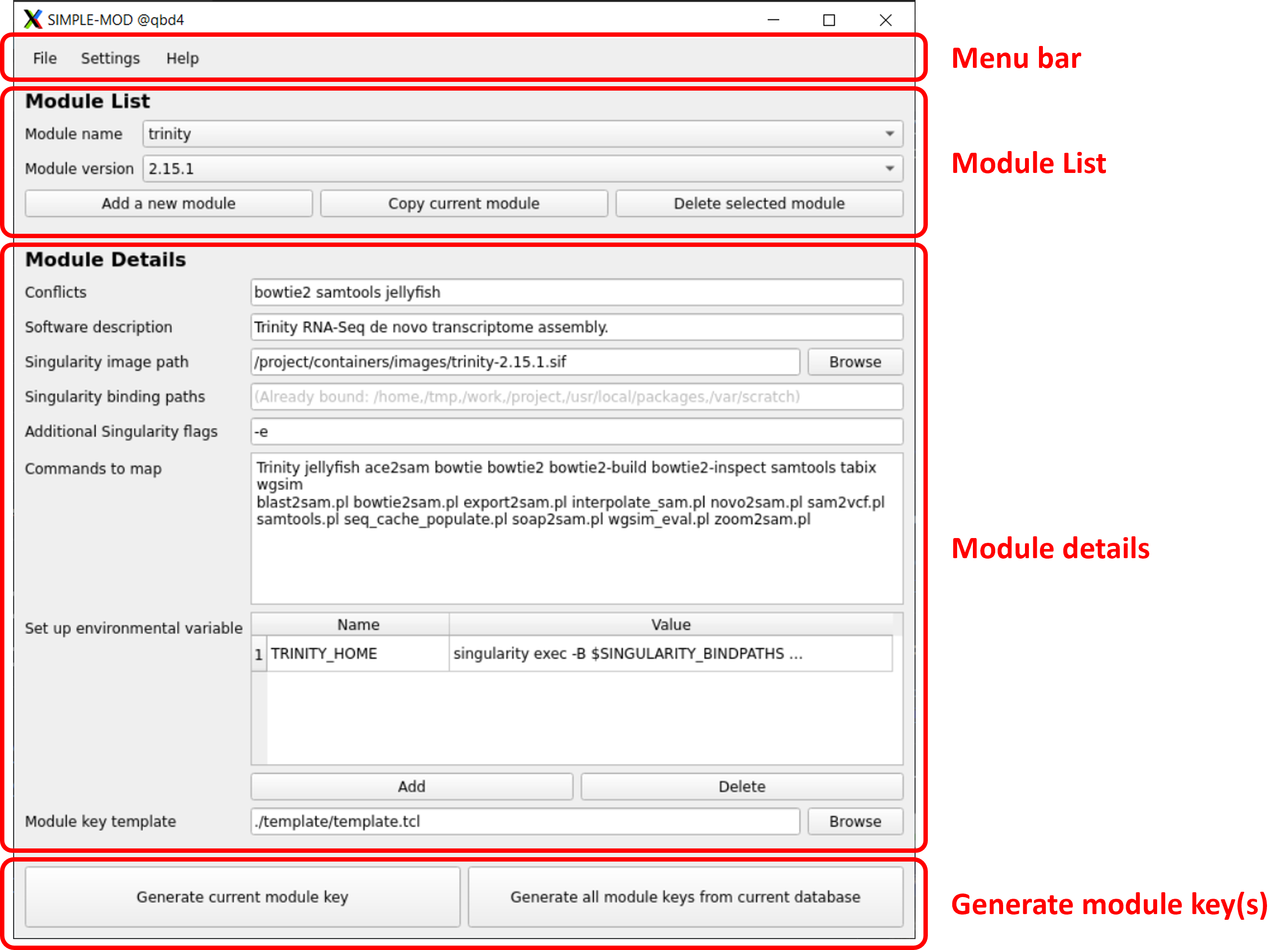
| Menu | Description |
|---|---|
| File | Create, open, and save module database (.json format). Save Database (Ctrl+S) overwrites the current file; Save Database As... (Ctrl+Shift+S) saves to a new file. |
| Settings | Change preferences (default paths, binding paths, flags, template, etc.). |
| Help | About information. |
| Action | Description |
|---|---|
| Select | Choose a module name & version to edit. |
| Add a new module | Create a new module in the database |
| Copy current module | Copy the current module as a new entry in the database. |
| Delete selected module | Delete the selected module from databse. |
| Field | Description |
|---|---|
| Conflicts | Conflicted modules that cannot be loaded together. (Itself is already added by default.) |
| Software description | Software description. |
| Singularity image path | Path to Singularity image. Can use a remote path if the host system supports it. |
| Singularity binding paths | Additional binding paths ("-B") appended to the default paths set in Preferences. |
| Additional Singularity flags | Additional flags to add (e.g., --nv for GPU support) appended to the default set in Preferences.. |
| Commands to map | Executables inside the container that need to be mapped as wrappers outside of the container. |
| Environment variables | Set up additional environment variables for the module, if needed. |
| Module key template | Template to generate module keys. Default: ./template/template.tcl |
| Button | Description |
|---|---|
| Generate current module key | Generate one module key from the currently open module. |
| Generate all module keys from current database | Generate all module keys from the currently open database (must save database first). |
The CLI interactive mode provides a full-screen terminal UI equivalent to the GUI, suitable for headless servers or SSH sessions without X forwarding.
All screens are full-screen radio-list dialogs. Navigation controls:
| Key | Action |
|---|---|
↑ / ↓ |
Move selection |
Enter |
Confirm selection |
Esc / Ctrl+C |
Go back / cancel |
Text-input dialogs accept free-form text and are dismissed with Enter (confirm) or Esc (cancel).
Main Menu
├── File
│   ├── New Database
│   ├── Open Database          (lists JSON files from default database directory)
│   ├── Save Database          (overwrites current file; prompts for path if new)
│   └── Save Database As...    (always prompts for a new path)
│
├── Module
│   ├── Select Module
│   │    ├── Edit Current Module
│   │    ├── Copy Current Module
│   │    ├── Delete Current Module
│   │    └── Generate Current Module Key
│   ├── Add New Module         (prompts for name + version)
│   │    ├── Edit Current Module
│   │    ├── Copy Current Module
│   │    ├── Delete Current Module
│   │    └── Generate Current Module Key
│   └── Generate All Module Keys from Database (must save database first)
│
├── Preferences
│   ├── Default database path
│   ├── Default Singularity image directory
│   ├── Default module key output directory
│   ├── Default module key template
│   ├── Always bind these paths
│   └── Always enable these flags
│
└── About
The fields are the same as in the GUI. See 3.1.3 Module Details
CLI command mode is non-interactive and suitable for scripting and automation pipelines. Unlike the GUI and CLI interactive modes, it has no built-in editor for the module database. The database JSON file must be created or edited manually (or by first using the GUI / CLI interactive mode).
./simple-mod <command> [options]| Option | Description |
|---|---|
-d FILE, --database FILE |
Path to database JSON file to load |
-c COMMAND, --cmd COMMAND |
Command to execute: gen-key or gen-all |
-o DIR, --output DIR |
Output directory for generated module key files |
--name NAME |
Module name (required for gen-key) |
--version VERSION |
Module version (required for gen-key) |
--nodisplay |
Force terminal mode instead of GUI |
Commands:
gen-key— Generate a single module key for the specified name and version.gen-all— Generate module keys for every module in the database.
# Generate a module key for a specific module
./simple-mod \
    --cmd gen-key \
    --database database/mydb.json \
    --name python \
    --version 3.11.0 \
    --output modulekey/

# Generate all module keys from a database
./simple-mod \
    --cmd gen-all \
    --database database/mydb.json \
    --output modulekey/
Output files are written to <output>/<name>/<version> (no extension), matching the convention expected by Environment Modules and Lmod.
The module database is a plain JSON file with a three-level hierarchy:
<database>.json
└── <module-name>          (string key, e.g. "pytorch")
    └── <version>          (string key, e.g. "2.6.0")
        ├── conflict                    (conflicts)
        ├── module_whatis               (software description)
        ├── singularity_image           (Singularity image path)
        ├── singularity_bindpaths       (Singularity binding paths)
        ├── singularity_flags           (additional Singularity flags)
        ├── cmds                        (commands to map)
        ├── envs                        (environment variables, a dictionary)
        │   ├── <VAR_NAME>: <value>
        │   └── ...
        └── template                    (module key template)
Field reference:
The fields are the same as in the GUI. See 3.1.3 Module Details
Minimal example:
{
    "pytorch": {
        "2.6.0": {
            "conflict": "tensorflow jax",
            "module_whatis": "PyTorch deep learning framework with GPU support.",
            "singularity_image": "/project/containers/pytorch-2.6.0.sif",
            "singularity_bindpaths": "",
            "singularity_flags": "--nv",
            "cmds": "python python3 pip pip3 torchrun",
            "envs": {},
            "template": "./template/template.tcl"
        }
    }
}
A database file can contain any number of module names, each with any number of versions. The GUI and CLI interactive modes can be used to create and maintain the database interactively, which is the recommended approach. Manual editing should follow the exact field names and types shown above.
Main author: Dr. Jason Li ( jasonli3@lsu.edu )
Jianxiong Li. 2024. "Transforming Container Experience: Turning Singularity Images into Loadable Environment Modules". In Practice and Experience in Advanced Research Computing 2024: Human Powered Computing (PEARC '24). Association for Computing Machinery, New York, NY, USA, Article 98, 1–2. https://doi.org/10.1145/3626203.3670551